StreamAvatars has been the go-to tool for Twitch streamers who want to give viewers a physical presence on screen. At $14.99 on Steam, it lets chatters spawn as pixel art characters, battle each other, earn currency, and interact through commands. It’s fun, highly rated (95% positive on Steam), and has an active workshop community.
But it’s not for everyone. Maybe you want something that doesn’t require a Steam purchase. Maybe the retro game aesthetic doesn’t fit your brand. Maybe you want something that makes your chat feel alive rather than turning your stream into a mini-game arena. Maybe you don’t want to have to download and install extra software and then set it all up.
Whatever the reason — here are the best alternatives available right now.
1. StreamAvatars — The Original
Best for: Viewer-controlled battles, mini-games, and deep customisation
Price: $14.99 on Steam
The original and still a strong option if you want full-featured mini-games baked into your viewer overlay. Chatters spawn as pixel characters, fight boss battles, play basketball, duel each other, and spend earned currency on customisations.
✅ Strengths
- Huge Steam Workshop library
- Deep mini-game ecosystem
- Multi-platform (Twitch, YouTube, Kick)
- Active community, long track record
❌ Limitations
- One-time cost ($14.99)
- Windows desktop app required
- Complex setup for dual-PC streamers
- Retro pixel aesthetic not for everyone
🔗 View on Steam | Official site
2. Evotars — The Free Browser-Based Alternative
Best for: Small and new streamers who want quick, zero-cost setup
Price: Free
Evotars is probably the closest like-for-like replacement for Stream Avatars — and it’s completely free. It’s web-based, so there’s nothing to download. Chatters become animated game-like characters on screen and can use commands like !jump, !dash, !grow, and !color. Channel point redemptions trigger actions too, and there’s support for BTTV, FFZ, and 7TV emotes. When your channel gets raided, incoming viewers’ avatars fall from the top of the screen.
Setup is as simple as it gets: log in with Twitch → copy your overlay URL → paste it as a browser source in OBS. That’s it.
✅ Strengths
- Completely free, no account needed
- Browser source — no software to install
- BTTV / FFZ / 7TV emote support
- Raid visualisation built in
❌ Limitations
- No custom avatar uploads yet
- Limited command set vs Stream Avatars
- Smaller development team
- Twitch-only
🔗 Visit Evotars | GitHub | OBS Forums thread
3. Kappamon / Triiibe — Virtual Stream Pets
Best for: Streamers who want a cute mascot pet on screen
Price: Free tier available

Kappamon — now rebranded as Triiibe — takes a different approach. Instead of chatters becoming characters, they interact with an adorable virtual pet on screen: cats, dogs, foxes, robots, and more. Your pet greets viewers, reacts to subs and follows, dances to music, and responds to custom commands. A great fit for cosy streams.
✅ Strengths
- Free tier available
- Adorable aesthetic, great for cosy streams
- Reacts to subs, follows, channel points
- Custom commands supported
❌ Limitations
- Paid mutations / customisations
- One pet on screen, not per-viewer
- Rebranding has created some confusion
- Smaller feature set than Stream Avatars
4. VibeCast — A Completely Different Take on Viewer Presence
Best for: Streamers who want a visually stunning overlay that makes every viewer feel seen — without the game-within-a-game
Price: 30-day free trial, then subscription
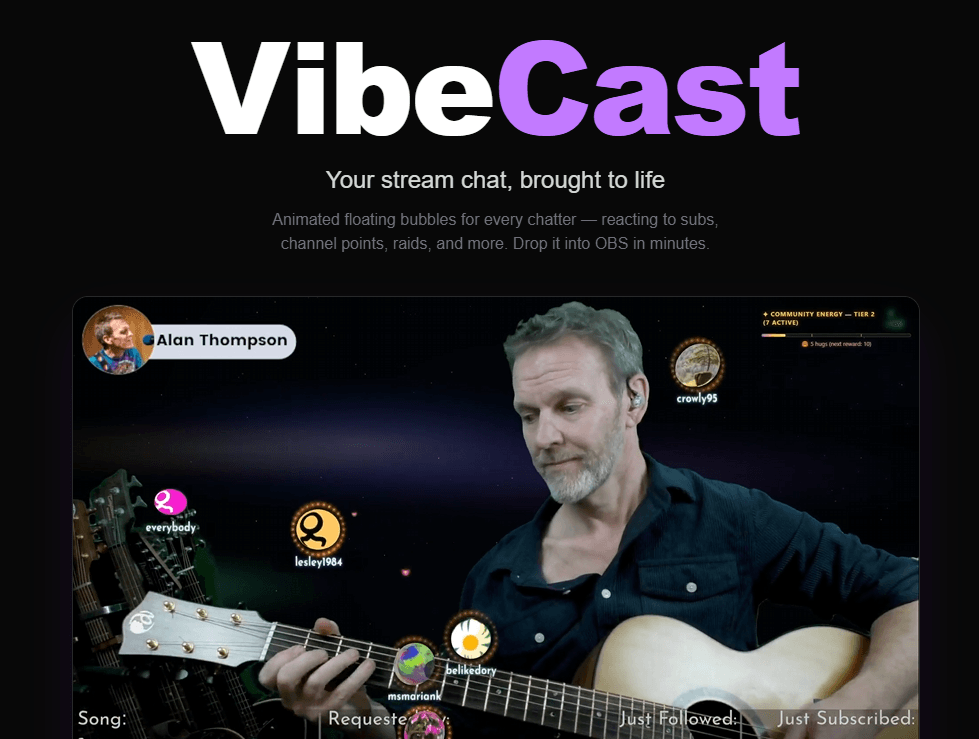
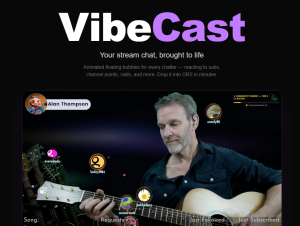
VibeCast takes a fundamentally different approach to viewer representation. Instead of pixel art sprites running around a battlefield, every chatter gets their own 3D animated bubble — rendered in a stunning WebGL scene directly in OBS as a browser source. Each bubble automatically shows the viewer’s Twitch profile picture and username. Anyone who types in chat instantly has a presence on screen. And loads of options to customise it to your liking.
When community moments happen, VibeCast reacts beautifully. Sub animations fire with gold rings. Bits trigger coin showers proportional to the amount. Hype trains escalate with energy effects that build across your stream. Raids bring an animated portal as new viewers pour in. Hearts fly from one user to another as they !hug @eachother.
For streamers who want that extra interactivity layer, chat commands and channel point triggers are fully supported: !gravity, !chaos, !spin, !magnet, !dance, !pool. Setup takes about two minutes: log in with Twitch, copy your overlay URL, paste into OBS.
✅ Strengths
- Every viewer auto-represented — no commands needed
- Visually stunning 3D WebGL scene
- Reacts to subs, bits, raids, hype trains
- Browser source — nothing to install
- Chat commands + channel point triggers
- 30-day free trial
❌ Limitations
- Twitch-focused (for now)
- Subscription required after trial
- No mini-games or battle systems
- No custom avatar art
🔗 Start your free trial at getvibecast.live →
Quick Comparison
| Tool | Price | Viewers on screen | Browser source | Aesthetic |
|---|---|---|---|---|
| Stream Avatars | $14.99 (Steam) | ✅ Yes | ❌ No | Retro pixel art |
| Evotars | Free | ✅ Yes | ✅ Yes | Simple sprites |
| Kappamon / Triiibe | Freemium | Pet only | ✅ Yes | Cute / creature |
| VibeCast ⭐ | Freemium | ✅ All viewers, auto | ✅ Yes | 3D WebGL bubbles |
So Which Should You Choose?
If you’re on a tight budget and want something immediately, Evotars is the obvious pick. It’s free, it works, and setup takes ten minutes.
If you love the mini-game and battle loop, Stream Avatars is still the best tool for that. Its Steam Workshop library gives it staying power that browser-based tools can’t match yet.
If you want a cosy mascot vibe with a cute creature reacting to your chat, Kappamon / Triiibe is worth a look.
And if you want a viewer overlay that actually looks premium — something visually distinctive that gives every single person who types in chat a beautiful presence on screen — VibeCast is in a category of its own. The 30-day free trial means there’s no risk to trying it.
Leave a Reply