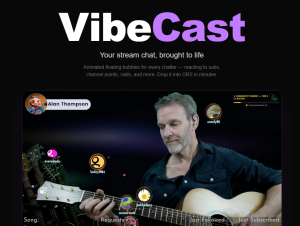
I’ve been streaming music on Twitch for a while now, and the thing I’ve come to love most about it is the people who turn up and hang out. Regular faces. New faces. The ones who keep supporting me with subs and gift subs, cheering with bits and just being there to take part and keep me going. Chat is company.
So I started building something to reflect that. Not just another chat box. There are zillions of those already. Something completely different.
VibeCast: Your Twitch Community as a Living, Animated World
What I built is called VibeCast — a physics-driven Twitch chat overlay that transforms your viewers into animated 3D bubbles, each with their own avatar and username, bouncing and reacting in real time inside your stream scene.
This isn’t a scrolling wall of text. Every active chatter has a physical presence on screen that moves, collides, and interacts with everyone else — live. It’s the most visually distinctive chat visualizer for Twitch you’ll find, and it works as a simple browser source in OBS. No complex setup. Just drop it in and stream.
(Chatters who prefer to stay invisible can opt out with a simple !hideme command.)
What Happens When Chat Comes Alive
This is where VibeCast goes far beyond a standard Twitch chat overlay:
- Message activity — when someone sends a message, their bubble animates and responds
- Bits & cheers — triggers a custom reaction animation on the chatter’s bubble
- New subscribers — a big golden celebration explosion lights up the scene
- !hug commands — hearts fly from sender to recipient; mutual hugs trigger a full rainbow cascade
- Channel point redemptions — 5 built-in effects your community can trigger, including gravity flips, chaos mode, magnet pulls, and spin effects
- Hype trains — the whole scene reacts when one hits
- Song request animations — a dedicated visual for music streamers when viewers request tracks or ask for the song list
- Pool minigame — a fully playable game for BRB screens, using chat bubbles as balls with live on-stream scoring
None of this needs configuring mid-stream. It all just happens.
Every effect can be individually toggled and controlled from your dashboard — so you stay in charge while your community makes the stream their own.
None of this needs configuring mid-stream. It all just happens.
The Feeling I Was Chasing
I wanted my viewers to feel like they were in the stream, not just watching it passively. And I wanted to feel it too — that sense that the room is full, that people are here, that their presence means more than a line of text disappearing up a sidebar.
What I didn’t expect was how much it would change the atmosphere. When your chatters have a physical presence in your scene, something shifts. They stay longer. They interact more. They start talking to each other and being more playful. The stream becomes less of a broadcast and more of a gathering.
That’s the thing I couldn’t have planned for — and it’s become the thing I love most about it.
Why I Want to Share It
I built VibeCast because I needed it. But I kept thinking about every other streamer who might love it too — anyone who wants to bring their audience closer and make the whole thing feel like a shared event.
If you’re looking for a Twitch overlay that actually does something new — that makes your chat community visible, interactive, and alive on screen — this is it.
VibeCast is currently in invite-only beta. I’m opening it up carefully, making sure the experience is right before it goes wider.
Head over to getvibecast.live and use your invite code to get started. And if you don’t have one yet — reach out. Let’s get you in.
VibeCast works as a browser source overlay in OBS and supports Twitch channel points, chat commands, subs, bits, follows, hype trains, and more.
Leave a Reply